Digital Marketing

HOW TO FIND A GOOD WEB DESIGNER

Have you ever gone to a business website and enjoyed the experience? The animation, design, colors, and ergonomics seduced you. You remember the brand, and you even signed up for the newsletter.

The appearance of a website influences the visitor. He may stay longer to check out the offers and navigate from one page to another. He will keep a positive idea of ​​the brand, and he can also talk about his experience to those around him. Creating a website requires both technical skills and a creative sense and also skills in human interaction.

So how do you go about finding a good web designer? What criteria should you rely on when searching? Here is some food for thought.

The qualities of a good web designer

So one of the things you know is to identify a decent web designer’s qualities. To do this, here are some tips that can guide you.

Have excellent computer skills

Computer skills are essential to understand the language of the web, such as HTML, for example. Knowledge is as much technical about software as it is about the interaction between the web and software.

Have consistency in your work

Throughout the process, the web designer will integrate a logical and continuous working method. His consistency will allow him fluidity in his tasks and find and fix an element that is not working correctly, for example.

Have a good stress tolerance

Projects go fast, deadlines are short, and requests for modifications or changes are numerous. Not to mention that the designer can work on several projects at the same time. Having a good stress tolerance helps to stay on course for different projects and ensure a quality project.

Important for a web designer: have a very strong sense of aesthetics

Finding a beautiful element is subjective. However, in the web world, it is necessary to have a strong sense of aesthetics to create designs that will make the business stand out from all the possible internet offerings. You have to have an eye to recognize what will or will not like the target and the company.

Take continuous web design training

What is his training? Does he take training to be on the lookout for the latest trends? As in fashion, trends in web design are constantly changing every year. The web designer must follow training regularly to update. It can be as simple as watching training capsules on the Internet, for example.

Know-how, know-how, and business acumen

A good freelancer will know how to master both the creative side and the rational side. He will know how to take the criticisms and comments made by the client. He will also be able to provide comments and professionally guide the client. Also, an educational aspect can be very useful in explaining concepts to the client. It is the know-how and the interpersonal skills.

Business acumen is also important for knowing where to put energy and for managing the project. He keeps the project moving in the right direction. Business acumen helps maintain a good business relationship with clients.

In short, no one is perfect. However, you might spot the qualities and skills in candidates you feel are most important to you. That way, you could choose the candidate that suits you best.

Find good web designers

While taking into account the characteristics of the right candidate, you can search the Internet to find web designers. You could analyze the different profiles and the different services offered. Through research, examples can inspire you for the design of your site. You could also see the different types of site operations and mention them to the web designer.

Check the portfolio of web designers

Once you’ve done your research and found potential collaborators, dig deeper by looking at their portfolios. Take a look at the projects and see if the sites have been very successful by reading comments left by customers. Test the sites for yourself for efficiency, ergonomics, and style. The verification part may take time, but it will be beneficial in making choices.

You might also know what type of project the designer has completed in the past, the type of business, if their artistic creation is right for you, etc.

Contact potential web designers

You are not able to know if you want to work with an agency or a freelancer? Please take a few minutes to call them and tell them about your project. In this way, the first contact will have been made, and subsequently, you can meet them to make a choice.

Get to know the designer

As you are trying to find out if a professional relationship is possible between the two of you. You can ask him questions to get to know him better. It is recommended that you meet with the person to establish a long-term relationship with them. Here are some ideas:

  • Ask him about the latest trends;
  • How does he work? What is the process?;
  • How does he see the deadlines ?;
  • Does he do small or big projects ?;
  • What is the price?;
  • Talk about these projects;
  • When he is available to start;
  • How long has he been doing this ?;
  • What are his training and his background ?;
  • Ask more technical questions to find out if it has an educational side.

Define your web design project

Define your goals to present them to the web designer. Having a clear idea of ​​what you want will help you make better choices and save time.

  • What do you want to promote?
  • Do you want a transactional site?
  • What is your budget?
  • Do you want to work with a freelance or an agency?

Of course, to find the right person, there is necessarily some upstream work to establish your purpose. It is also possible that the parameters are determined with the designer to adapt to his skills.

Ask your entourage

You can ask those around you if anyone has any recommendations for a web designer. You may have an acquaintance that can give you a helping hand.

Finally, if you do a lot of work upfront, it will be profitable throughout the process, and the results will be more likely to be there. Also, note that a freelancer can be inclined to do smaller projects. However, it can also hire specialists to carry out large-scale projects.

Do you want to launch your online business presence? Are you looking for Web Development in Pakistan to upgrade your web design? Count on us to get competing Web Design and Development services.


Digital Marketing

The 10 best tools to create a landing page for free

Several years ago, when I worked in London for a very dynamic marketing agency (and drank way too much coffee), I managed digital projects for large accounts.

One of the requests that came up most often was for landing pages (or landing pages ). My clients regularly ran big budget email marketing campaigns and so logically needed landing pages to direct their prospects.

As is often the case in agencies, client needs were generally urgent. And they were willing to shell out thousands of dollars to get what they wanted.

Yes, you read that right: thousands of dollars, most often for a simple landing page.

I am not saying that this amount is not justified. A quality landing page requires many thoughts and a talented team of designers, developers, and project managers.

If your company is a recognized brand capable of investing this type of budget, why not. But what if you’re a smaller business that needs a landing page just as much?

Fortunately, things have changed a lot in recent years. Thanks to online tools such as email marketing software and website builders, it is now possible to create low-budget landing pages. 

Let’s review the various free landing page builder tools and their pros and cons.

But let’s start from the beginning: what criteria should I consider when choosing a free landing page builder?

We have listed below the things to consider when evaluating a free landing page’s quality of services. Some of these criteria are essential for lead generation, while others are assets that will optimize your campaigns:

  • Neat design: designing landing pages is quite an art. They should be created with ease of use in mind. It is therefore essential to choose a tool that offers ergonomic and well-thought-out models.
  • CTA forms and buttons: The landing page’s main goal is to capture leads and convert them into customers. Make sure that the solution you choose allows you to embed forms or CTA buttons on your page.
  • Responsive display: your landing page must be displayed perfectly on mobile. Most free landing page builder software offers this feature.
  • Social media sharing: Sharing your landing page on social media is a great way to increase visibility. Check that your tool allows you to enable sharing with the different platforms.
  • Integration with your email marketing software: if your landing page builder allows you to automatically add leads to your emailing or marketing automation software, it will save you time and energy considerations.
  • Tracking: can your landing page tool be connected to Google Analytics? This will allow you to gather valuable information about your pages’ performance and how you can improve them.
  • A / B testing: Although this feature is rarely offered in free plans, it can be very useful if your pages are getting heavy traffic and you want to know how to optimize them.

MailerLite

Using email marketing software to create your landing pages is advantageous: grouping all your contacts, landing pages, and emailing campaigns in one place greatly facilitates their management.

MailerLite is an email marketing tool that is one of our favorites at Web Design and Development: we appreciate its simplicity and ergonomics. Luckily, it offers a free plan that includes an unlimited number of landing pages and up to 1,000 subscribers.

We like: 

the flexible and easy-to-use landing page editor. You can modify the template as you like by moving the content blocks with the mouse. The fields of the forms are easily adjustable, and the data collected is sent directly to the list of your choice. Social media sharing buttons are included, as well as options to modify SEO settings (you can specify whether you want your landing page to be indexed or not). Another highlight is that you can trigger some handy automation for new contacts, such as welcome messages and drip marketing campaigns.

Needs Improvement :

Surprisingly, with MailerLite’s free plan, you can access more templates for landing pages than emails. No email template is included, which means you’ll have to create one yourself (but it’s still easy to do in the visual editor). Your page is hosted under a generic domain name (www.pagedinscription.com/yourpage), which is quite common for free plans.

Who is this tool for?  Both beginners and experts in marketing. MailerLite is one of the best free landing page builder tools: neat templates, great flexibility, and practical options to manage automation. Its advanced options for forms are particularly useful for companies targeting the European market and sensitive to privacy issues under the GDPR.

MailChimp

You might be surprised (or not) to learn that the world’s most popular email marketing software also offers a solution for creating landing pages. They are available in MailChimp’s “Free Forever” plan, allowing you to send 12,000 emails per month to up to 2,000 subscribers.

We like: 

the landing page editor, like MailerLite, is easy to use and offers many customization options. You can analyze your pages by integrating the Facebook pixel, Google Analytics, or the MailChimp tracking system. You can also trigger automation via the editor, which is not the most intuitive, however.

Needs improvement:

The choice is limited to five models, but the designs are quite successful. You can’t customize your Thank You / Confirmation page, and there are fewer options for changing form settings than with MailerLite. By default, your URL will use a MailChimp domain. To use your domain, you will need to pay $ 99 / year.

Who is this tool for?  If you’re looking for an email marketing service with a built-in landing page editor and find MailerLite’s 1,000 subscriber limit a bit restrictive, MailChimp may be a good alternative.

Omnisend

While not as well-known as MailChimp, this e-commerce-focused email marketing solution also includes a landing page builder tool. With its free plan, which allows you to create up to 3 landing pages, send 15,000 emails per month, and have an unlimited number of subscribers, Omnisend fully deserves its place in our ranking.

We appreciate: 

I must say that Omnisend’s landing pages are very successful with their modern and minimalist designs. However, they’re all about simplicity, so they’re not ideal if you have a lot of content (which, to be fair, isn’t recommended on a page that aims to boost conversions). You have the option to edit confirmation and error messages and add GDPR related fields.

Needs Improvement: 

Except for the background, you can’t customize the design and layout. Cannot add additional fields in forms either (only email address is available), and automation is not included in the free plan. Last particularly annoying point: to publish your landing page, you will have to connect your account to an online store and sign up for a 14-day trial (after which you can switch back to the free version).

Who is this tool for?  I wouldn’t use Omnisend exclusively as a landing page builder. I would recommend it instead to online store owners who will be able to use email-related features like discount codes and sales reports (included in the free plan). However, the 3-page limit of the free version is quite restrictive. At some point, you will need to consider upgrading to a paid plan.

ONTRApages

ONTRAPORT is a very powerful email marketing service known for its marketing automation and CRM functionality. ONTRApages software is offered as an independent product free of charge and separate from the landing page editor integrated into ONTRAPORT. You can create up to 10 landing pages for a maximum of 2,500 monthly visitors.

We appreciate: 

The wide choice of models and the possibility of creating your model from A to Z. You also benefit from great flexibility in design thanks to a block-based approach. You can edit form fields and view visitor and conversion statistics directly in the tool.

Needs Improvement: 

The user interface and design templates are a bit dated. Plus, not all models are completely “free” – some require you to subscribe to somewhat obscure third-party mailing lists. Rather imposing, the editor can also make you dizzy. You cannot integrate your landing pages with a third-party email marketing or CRM service in the free version: the leads are sent to your email address.

Who is this tool for?  This tool is not revolutionary. However, if you don’t expect too much traffic, you can handle leads more or less manually. Like the idea of ​​having access to built-in reports, ONTRApages will do just fine as an independent landing page creation software.

Wix

Praised for its polished website editor, Wix is also a great tool for creating one-page sites. Among the wide array of modern site templates, there is a selection of around 30 landing page designs. All of them are customizable and available for free (if you don’t mind using a Wix domain for your URL and having Wix ads on your page).

We appreciate: 

The great flexibility in terms of design. If that’s what you’re looking for, you won’t be disappointed with Wix. You have almost free rein to arrange the elements the way you want. You can use many types of content (galleries, videos, testimonials, maps, etc.). Form data is saved to your contact list in Wix. You can trigger automated emails (such as thank you or welcome emails) that will be sent to the tool through Wix ShoutOut. You can even add third-party apps so that contacts are integrated directly into your email marketing tool (such as MailChimp, Constant Contact, or AWeber).

Needs Improvement: 

Overall, Wix is ​​fairly easy to use, although the editor may seem a little overwhelming at first. As it is a complete site builder, it is not the easiest solution to create a landing page, and then getting started can take a little more time. To use your domain, you will need to purchase a paid plan.

Who is this tool for?  Wix is ​​a complete and reliable solution for building landing pages that I would recommend instead of expert design marketers who want pages to look professional while maintaining a sufficient control level.

Weebly

Weebly is another website builder often compared to Wix. It has built a solid reputation among the easiest to use website builder software. Weebly doesn’t offer landing page templates per se, but its rather polished designs can be tweaked to achieve a single page layout. As with Wix, sites can be published for free as long as you use the Weebly domain and accept publisher advertising.

We appreciate: 

The great flexibility in site design and the possibility of adding multimedia elements, forms, and other content. You can also add apps that allow you to integrate your page with external email marketing tools. Not to mention that Weebly remains unbeatable in terms of ease of use: the learning curve is much less steep than that of Wix.

To improve: 

The models are beautiful, but the choice is not delusional. There is no built-in option for tracking automation, and site statistics are not available in the free version. Again, you will have to pay to use your domain.

Who is this tool for?  If you love the idea of ​​using a flexible website builder for your landing pages and are looking for a very easy-to-use tool, Weebly is your best option.

Strikingly

Strikingly is a website editor specializing in one-page sites. The free plan allows you to create an unlimited number of landing pages and test the features, even if you will not have full access to some of them (like adding your code or defining actions specific to mobiles). As with other site builder software, you won’t escape a Strikingly domain and ad with the free version.

We appreciate: 

The variety of the model catalog. You’ll be spoiled for choice, and some designs are striking. Very intuitive, the editor offers different layout options for each section. Another advantage: a very practical preview tool to check the display of your landing page on a computer, tablet, and mobile. Data such as visitor statistics are available, as is Google Analytics tracking. We also found the support to be efficient and responsive.

Needs improvement: 

Unfortunately, the available form fields are limited to a handful. The contacts are sent to the chosen email address and saved in the tool, but it is impossible to integrate them with external tools.

Who is this tool for?  Strikingly allows you to create more complex one-page sites than a standard lead capture landing page with minimal effort. If you want to create a complete site that displays on one page, Strikingly’s templates are for you.

Ucraft

The Ucraft website editor offers elegant and sophisticated landing page templates. With Pharrell Williams and Ice Cube on its homepage, it’s hard to imagine a cooler tool! Ucraft’s free plan lets you create sites with discreet advertising. Unexpectedly enough, you get the option of using your domain name for free (by the way, you have to have one if you want to use forms).

We like: 

The easy-to-use editor in which you can move elements with the mouse allows you to add basic elements such as images, galleries, buttons, and videos. Integrating forms with MailChimp, Google Sheets, and Intercom is also a snap. Finally, it’s the only landing page builder we’ve tested that lets you use your domain name for free.

Needs Improvement: 

The free version limits the pieces of content you can embed on your page (if you want to use a form, be sure to choose a template that includes a basic one).

Who is this tool for?  Ucraft’s bold designs are probably more likely to appeal to the general public than to businesses. These templates are perfect for launching a brand, hosting events, offering app downloads, or building interest in new products. Finally, if you want to use your domain name without paying, that’s more or less your only option!

Webnode

Without claiming to play in the same court as Wix or Weebly, the website publisher Webnode is not doing so badly with its 30 million registered users. Recognized for its mastery of multilingual sites, Webnode does not offer models specifically dedicated to landing pages. Still, all of its designs can be personalized to obtain a one-page site.

We like: 

the free version that displays only discreet advertising and the site models are among the most beautiful on the market. You can also change the SEO settings. You have the option of creating multilingual pages, but to access these features, you will need to purchase a paid plan.

Needs Improvement :

Webnode is basic website builder software that lacks some advanced customization options offered by other tools. For example, button text can only be changed to display URLs. The form options are also limited: you can add registration, reservation, and order forms, but it seems impossible to add a simple contact form.

Who is this tool for?  The answer is not obvious: Webnode is not the most powerful or the most advanced tool, nor does it stand out for its ease of use. However, it is a reliable solution for those who want to create landing pages in multiple languages, but keep in mind that you will have to pay $ 11.95 / month for this feature.

Carrd

Here is a new platform that is talking about it on the one-page website market. Founded by a former template designer, Carrd offers striking responsive designs for creating landing pages, profiles, portfolios, and other single-page sites. With the free version, you can have up to three sites. Be careful, however: you will not be able to use forms unless you subscribe to a paid plan. Note that plans are starting at $ 9 / year, making Carrd the cheapest landing page builder among those we tested.

We appreciate: 

Test the tool directly and start creating a landing page without registration to get an idea without committing. The modern and ergonomic interface is a big highlight. I also liked the catalog of very stylish models. Finally, integration with tools like MailChimp, MailerLite, ConvertKit, and GetResponse allows your subscribers to be referred directly to your email marketing service.

Needs Improvement: 

Text formatting is not as easy as in other editors. You will need to use a markdown-like markup language to change text styles. You will also need CSS knowledge for formatting, and you cannot change fonts. Overall, the editor works a little differently than what we’re used to. Getting started is not overwhelming, but it can take a bit of time.

Who is this tool for?  With the cheapest plans on the market, Carrd is the most affordable solution if you want to use your domain name and integrate the tool into your email marketing software. Just keep in mind that this platform has limits in customization and is not as flexible as other software like Wix or Weebly.

Do you want to launch your online business presence? Are you looking for Web Development in Pakistan to upgrade your web design? Count on us to get competing Web Design and Development services.
Digital Marketing

Responsive site: 6 advantages of responsive design

What is an adaptive site? Definition.

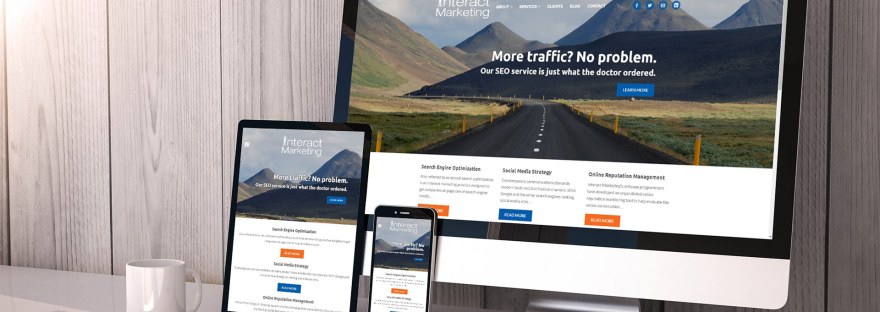
An adaptive or “responsive” website adapts to all screen sizes and all resolutions. Regardless of the device used, the website will display as well and provide access to the same information by adjusting its formatting. It helps provide an ergonomic user experience on all devices. You can contact our team for your Web developement in Pakistan.

Why create an adaptive site?

Beyond being useful, the responsive website is now a necessity for businesses. In particular, it allows your site to be optimized for mobile and thus opens the way for you to acquire new customers. Google has announced that mobile adaptability has an impact on website SEO. Consequently, a responsive website will have a better chance of being well placed by the Google Index and of gaining more visibility regardless of the device used by the Internet user.

Your site embodies your business on the web; it must proudly represent your identity and your values. An adaptive website allows you to convey a sense of performance and confidence to your audience. If your user has to magnify their mobile screen to find important information or successfully navigate your site, they will have an unpleasant experience. In a competitive environment, companies can no longer afford not to have a responsive website.

Responsive site: mobile-first vs responsive design

There are two principal ways of creating a responsive (or responsive) website. The first mobile (or mobile-first) and responsive design (responsive design). Concretely, it is the same process in two opposite directions. They make it possible not to have to create a dedicated mobile site which is a second site devoted only to mobiles. The separate mobile site is very costly in time, money, and SEO efforts.

  • “Mobile first” consists of creating an adaptive website starting from the mobile interface, then adapting it to tablets and computers. It should be favoured if your audience mainly uses the mobile to visit your site. It is a technique designed for mobile use.
  • Responsive design allows you to create an adaptive website starting from the computer interface. If more than 60% of companies have increased their revenues thanks to responsive design, it is no coincidence. This is the most common technique for creating a site compatible with all devices. Responsive design allows you to create a website that will adjust to all screen sizes and all resolutions. Google considers that an adaptive webpage created in responsive design allows efficient mobile use. It, therefore, will enable you to meet the search engine’s SEO criteria.

What are the benefits of a responsive site?

1. An Adaptive Architecture

Creating a responsive website allows you to adopt a structure (or architecture) compatible with different devices that emphasize the essential pages of your website. How you structure information is crucial for your visitor. Your site must make critical information accessible to your customer. With an adaptive website, the user can access the critical elements of your site, whether on mobile, tablet or computer.

2. Ergonomic Navigation

Thanks to its adaptive architecture, a responsive website provides an optimal user experience on all devices. Your menus, your texts or the placement of your buttons are adjusted to the different screen sizes. No need to do individual work on each format to get your website responsive. Thanks to the responsive design, you can benefit from optimized navigation for all types of screens.

3. Multi-Screen Content

Have you worked hard for successful content creation and want to avoid repeating the task to make your site mobile-friendly? With responsive design, your textual content adapts to the user by adjusting its formatting according to the device. Font size, the width of text columns, size, and call-to-action writing follow suit and change based on the screen.

4. Visuals That Adapt

The visual power of images on a website is no longer to be proven, whether on a tablet, computer or mobile, they are essential. A responsive website allows automatic adjustment of the size of your images. As you can see above, the photos on the Combustible site change layout depending on the screen size. On computer and tablet, we have 2 shots per column, but only one for the mobile version. The visuals adapt to provide an ergonomic experience.

5. Better Seo

Among the practices for optimizing SEO, owning an adaptive website occupies a key role. The responsive website, unlike the separate mobile site, allows you to bring together your natural referencing or SEO (Search Engine Optimization) efforts on your site. Creating a responsive website will enable you to acquire traffic from all types of devices. An excellent adaptive place reduces the bounce rate (premature end of the visit) on mobiles and tablets by offering a better user experience this improves the opportunities to appear at the top of the search results.

6. A Variety Of Tools Available

To create a responsive website, you are spoiled for choice. Here are software and tools that allow you to design a responsive website for your business:

  • Online creation tools are plentiful and will enable you to create a responsive website easily. They are easy to use but do not allow a great personalization of your website.
  • CMS (Content Management System) like WordPress is the most used software. Thanks to them, you can create a responsive and highly personalized site. Your site will meet your needs perfectly but will require a minimum of expertise to be managed.
Digital Marketing

Website Design

Did you know that nearly half of Quebec businesses do not have a website while 80% of world people consult a website before buying a product or service? Working with a website design agency represents for your SME the opportunity to be visible to the 33 million world people Internet users. This visibility will be a new way to reach your potential customers and increase your turnover.

If you want a website, you can contact us on our website: Web Development in Pakistan.

What Is Website Design?

Website design is a critical element of a development strategy. A website is a crucial tool for corporate visibility on the Internet. A useful website will enhance not only attraction but also the acquisition and retention of new customers.

Website Design In A Few Questions

The SMEs who called on our website design agency were able to find the answers to the following questions:

  • What are the current expectations of target consumers?
  • How to increase the visibility of my SME among a more extensive qualified clientele?
  • How to increase the competitiveness of my company in its market?
  • How can I gain credibility in my industry and with my customers?
  • How do I communicate my product and service offers to a larger number of prospects?

Most SMEs face high start-up costs and have limited financial resources. However, you should know that website design adapts to any budget. More than an expense, it is, above all, a smart and profitable investment for your web strategy.

If you own an SME and you have the ambition to accelerate its growth and increase its income, working with our website design agency will allow you to benefit from a profitable and tailor-made continuous sales vector. Our experts in website design and natural referencing master the skills necessary to create a high-performance website visible on search engines. This will allow you to place your business at the center of your target customers’ online shopping process in a sustainable manner.

7 Services Associated With Website Design

Depending on your offer and your objectives, our website design agency Digital offers several types of website design services:

Analysis

A website analysis identifies the weaknesses of an existing site that impact its performance and quality. Develop the web site, win search engine positions, and attract more potential customers.

Showcase Site

The purpose of website creation is to expose and present your company’s offer and activity to its potential targets. Increase your visibility, your customers, and, ultimately, your profitability.

Online Store

An online store will allow you to sell your products and services on the web. Stimulate your sales, expand your customer base, without any geographic limit.

Responsive Site

A responsive site is a website modification to make it available on all devices, including the smartphone. Offer an optimized experience to your targets, increase their engagement, and give yourself the chance to convert them into customers.

Blog

Blogging offers added value to your business by writing periodic articles on topics related to your business. Showcase your expertise, increase your website traffic, and engage your consumers.

Portfolio

Our web design agency creates a portfolio that will showcase your company’s achievements. Show your know-how and skills and increase your credibility with your potential customers.

WordPress Training

Our WordPress training will give you the keys to controlling your website yourself after its creation. Become independent within your own business.

By choosing our Digital website design agency as a partner, our team of web developers, web designers, ergonomists, and web editors will ensure you have a website:

  • It is optimized for search engines.
  • Technical and functional, offering smooth and pleasant navigation.
  • With a personalized and pleasant design, adapted to your image and your target.
  • Compatible on all devices (tablet, mobile, computer).
  • Safe and reliable by including secure payments, buyer notices, and other protections against security breaches.

Do you already have a website, but can’t find the time to update it regularly? Our content marketers will help you produce and publish rich, regular content that will increase the visibility of your website.

Entrust Your Project To Digital, Website Design Agency

By selecting Digital, you can count on a website design agency that:

  • I will listen to your needs and your expectations. To ensure a site in your image, you will remain the final decision- maker for each step of the design of your website.
  • Experts in website design will design your website.
  • Share the progress of its actions in full transparency. You will be aware of our progress on your website in real-time thanks to a standard management tool.
  • I will be at your disposal to answer all your questions and support you in the daily management of your website.
  • It Will does not make you sign any contract. You are free to end your collaboration with Digital whenever you wish.